U.S. virtual mailbox for customers in South Korea

PostalBridge helps customers in South Korea get a real U.S. mailing address, view incoming envelopes online, request secure scans, and forward U.S. mail when needed.
See available locations and pricing.

  • U.S. mailing address from South Korea
  • View incoming envelopes online
  • Request secure scans from your dashboard
  • Forward U.S. mail to South Korea when needed

Who this works well for

Customers in South Korea use PostalBridge to maintain a U.S. mailing address for business, investment, and personal correspondence.

Entrepreneurs and founders in South Korea

Use a U.S. mailing address for client correspondence, LLC paperwork, and business mail while operating from South Korea.

Foreign-owned LLC owners in South Korea

Maintain a U.S. address for company filings, tax documents, and compliance-related mail without a physical U.S. presence.

Cross-border sellers in South Korea

Route marketplace notices, vendor invoices, and customer-related mail to one U.S. address managed from South Korea.

U.S. real estate investors in South Korea

Manage property mail, brokerage statements, and investment paperwork from South Korea without relying on a borrowed address.

Families and expats in South Korea

Keep personal mail, account notices, and family correspondence tied to a stable U.S. address accessible online from South Korea.

Everything you need to manage your mail
These are the most common scenarios where customers in South Korea rely on a U.S. virtual mailbox.
USPS-style daily mail digest
See incoming envelope images in one daily summary so you know what arrived before taking action.
Scan, forward, store, or shred
Choose the next step online instead of forwarding every piece of mail automatically.
Your own mailbox number
Use a real partner mail center street address with a mailbox number assigned to your account.
Alerts and online control
Manage mail from your phone or computer and keep every request tied to your mailbox history.

PLANS & PRICING

Choose your virtual mailbox plan
Securely manage personal or business mail from anywhere.
Start small and upgrade when your needs grow.
Audience:
Billing:

Need regular scanning or shredding?

30-day money-back guarantee

Try PostalBridge risk-free. If it's not the right fit, cancel within 30 days of your successful signup payment and we'll refund your original signup payment, excluding pass-through costs like shipping, deposits, and per-use fees.

Learn more
Starter
$7.99
/ mo
or $79.00 / yr
1 recipients included
5 mail items processed / mo
Real U.S. street address
Unlimited envelope photos
Forward anywhere*
Try risk free
Basic
$9.99
/ mo
or $99.00 / yr
2 recipients included
30 mail items processed / mo
Real U.S. street address
Unlimited envelope photos
Forward anywhere*
Try risk free
Most popular
Standard
$14.99
/ mo
or $149.00 / yr
2 recipients included
60 mail items processed / mo
Real U.S. street address
Unlimited envelope photos
Forward anywhere*
Team access & permissions
Mail automations
Searchable scans + translation
Try risk free
Pro
$24.99
/ mo
or $249.00 / yr
2 recipients included
90 mail items processed / mo
Real U.S. street address
Unlimited envelope photos
Forward anywhere*
Team access & permissions
Mail automations
Searchable scans + translation
Try risk free
Platinum
$39.99
/ mo
or $399.00 / yr
2 recipients included
120 mail items processed / mo
Real U.S. street address
Unlimited envelope photos
Forward anywhere*
Team access & permissions
Mail automations
Searchable scans + translation
Try risk free

* Postage/shipping billed separately.

Starter plans have lower monthly pricing. Overages and select add-ons are priced 20% higher than Basic and above.

Applies to all plans: 30-day storage included | Free discard on request | 48-business-hour processing SLA | Secure shredding available

Set up your digital mailbox in four clear steps

Choose a U.S. address from a partner mail center, complete USPS Form 1583, view incoming envelopes online, and request scans, forwarding, or storage while managing mail from South Korea.

Step 1

Choose a U.S. address

Select a U.S. location from a PostalBridge partner mail center that fits your needs.

Step 2

Create your account

Set up your account and add recipients who need mail handling access.

Step 3

Complete USPS Form 1583

Finish the required USPS verification online with acceptable identity documents.

Step 4

View mail online

See envelope images in your dashboard and decide what needs attention.

Step 5

Forward to South Korea or take action

Request scans, forward originals to South Korea, or use storage or shredding where supported.
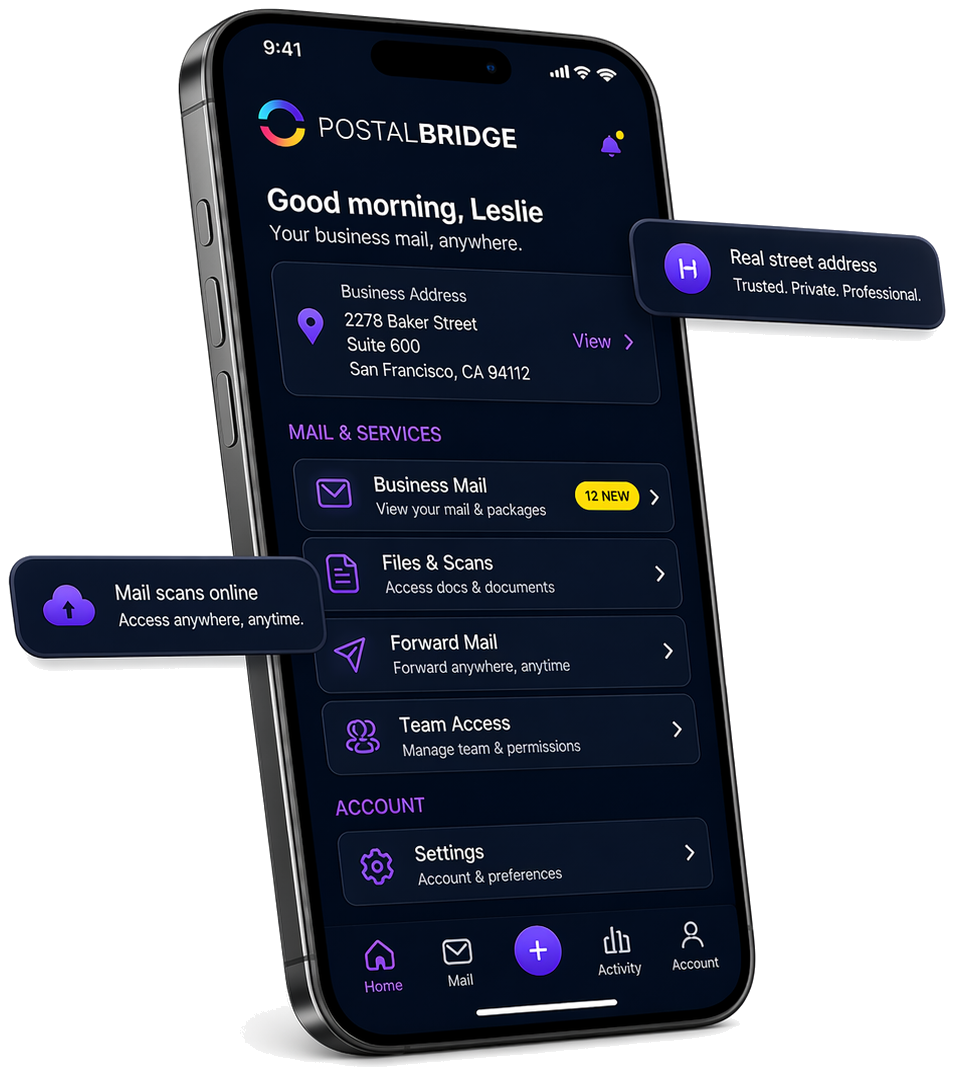
PostalBridge mobile app showing a real street address, business mail, scans, forwarding, and team access

See what arrived, then choose what happens next

Once your address is active, PostalBridge keeps incoming mail, scan requests, forwarding, and account actions visible in one dashboard so customers in South Korea can keep moving without losing context.

U.S. business mail

Keep business correspondence, client documents, and vendor mail flowing to one U.S. address you can manage online from South Korea.

Foreign-owned LLC mail

Receive LLC paperwork, tax documents, and company notices at a stable U.S. address while managing the business from South Korea.

Marketplace and vendor correspondence

Route marketplace notices, supplier invoices, and business mail to one U.S. address while your operations are based in South Korea.

Get a U.S. mailing address that works from South Korea

Compare live locations, review forwarding options, and choose a U.S. virtual mailbox that keeps your U.S. mail visible from South Korea.

U.S. virtual mailbox for customers in South Korea — FAQ

Answers to the questions customers in South Korea most often ask about getting a U.S. mailing address.

Can I open a PostalBridge mailbox while living in South Korea?
Yes. Choose a U.S. location, create your account, upload the required IDs, and complete USPS Form 1583 through the online verification flow. Wait until the mail center approves your mailbox before directing mail to the new address.
Can I use my passport when applying from South Korea?
Yes. A current passport can serve as the required government-issued photo ID, even if it was issued by a country other than the one where you now live. You must also provide a separate, current document showing the same home address you enter on Form 1583.
Which proof-of-address documents should I prepare in South Korea?
USPS lists a current lease, mortgage or deed of trust, home or vehicle insurance policy, vehicle registration card, or voter card as acceptable address documents. Use a document showing the same road-name address, building or unit, district and city, and five-digit postal code that you enter on the form. Utility bills and bank statements are not listed on Form 1583, so prepare one of the listed document types instead.
Can I submit a Korean-language address document?
The mail center or notary may request an English translation. Upload the complete Korean original and prepare a Roman-character version that keeps your name, address components, dates, and document type consistent.
Can I complete notarization online?
Yes. You can complete Form 1583 notarization online using a U.S.-commissioned online notary. If you’re outside the U.S., have your passport ready, along with a second acceptable document that verifies your home address. You can use a remote online notary service to complete the notarization by live video.
How should I prepare a forwarding address in South Korea?
PostalBridge can forward eligible mail when the selected mail center and carrier support the route. Provide an accurate Roman-character address and, when supported, the Korean version too; include the road name, building and unit, district and city, and five-digit postal code. Review a scan first when possible, and allow for postage, customs processing, duties or taxes, and carrier delays.
Can I use the address for a U.S. company I run from South Korea?
You can use a PostalBridge address for routine company mail. It does not automatically satisfy registered-agent, principal-office, licensing, banking, or marketplace address requirements. Check each requirement separately before listing the mailbox.
Will U.S. banks, Amazon, Stripe, or PayPal accept the address for someone in South Korea?
Acceptance is not guaranteed. Each bank, marketplace, payment processor, and government agency sets its own address and residency rules. Ask the institution whether it accepts a CMRA or virtual mailbox before changing a critical account or filing.

Important disclaimer for customers in South Korea

PostalBridge provides a U.S. mailing address and digital mailbox workflow. Requirements for banks, marketplaces, government agencies, payment processors, registered agents, tax filings, and compliance reviews vary. PostalBridge does not guarantee third-party acceptance and does not provide legal or tax advice.

  • Confirm separately whether your bank, marketplace, payment processor, or government agency accepts a virtual mailbox address before using it for critical accounts.
  • Treat any registered-agent, tax-filing, or business-licensing requirement as a separate check that may require more than a mailing address.
  • Documents not in English submitted for identity verification or account setup may require translation or additional review by the receiving entity.